사용설명서
Team HAI 플랫폼의 모든 기능을 단계별로 안내합니다. 브랜드 설정부터 성과 측정까지, 처음 사용자도 따라할 수 있는 상세 가이드입니다.
On this page
Screenshots may differ from the current interface. See the terms, measurement and analysis guide below for current metric definitions.
시작하기
Team HAI는 4단계 서비스 플로우를 통해 브랜드의 AI 검색 노출을 체계적으로 관리합니다. 처음 사용자라면 아래 순서대로 시작하세요.
빠른 시작 체크리스트
처음 사용할 때는 브랜드 등록 → 진단 → 전략 기획 순으로 진행하는 것을 강력히 권장합니다. 브랜드 정보가 충분히 등록되어야 진단 결과가 정확해지고, AI 콘텐츠 생성 품질도 높아집니다.
브랜드 관리
Team HAI의 모든 기능은 브랜드 정보를 기반으로 작동합니다. 브랜드의 이름, 별칭, 제품, 경쟁사, 미디어 채널을 등록해 Team HAI의 분석 대상을 설정합니다.
정의
주요 기능
멀티 브랜드 지원
여러 브랜드/서비스를 한 계정에서 관리하고 전환할 수 있습니다.
Brand analysis context
Check your brand name, aliases, official website and comparison brands. These settings provide context within Team HAI; they do not directly train external AI models.
경쟁사 추적
경쟁사 정보를 등록해 SOV 비교 분석에 자동 활용합니다.
미디어 채널 관리
Owned/Earned 미디어 채널을 등록해 통합 관리합니다.
사용 설명
브랜드 목록 화면 접속열기
왼쪽 메뉴에서 '브랜드 관리'를 클릭합니다. 현재 조직에 등록된 브랜드 목록이 표시됩니다.
+ 새 브랜드
새 브랜드를 생성합니다. 브랜드명, 산업, 기본 정보를 입력하는 다이얼로그가 열립니다.
브랜드 선택기
대시보드 상단에 위치한 드롭다운. 현재 활성 브랜드를 표시하고 전환할 수 있습니다.
기본 정보 탭
브랜드명, USP, 키워드, 산업 등 핵심 정체성 정보를 입력하는 탭입니다.
채널 탭
Owned/Earned/소셜 미디어 채널 URL을 등록하는 탭입니다.
경쟁사 탭
비교 분석할 경쟁 브랜드를 추가하고 관리하는 탭입니다.
저장
입력한 브랜드 정보를 저장합니다.
새 브랜드 생성 또는 기존 브랜드 선택
우측 상단 '+ 새 브랜드' 버튼을 클릭해 새 브랜드를 만들거나, 기존 브랜드 카드를 클릭해 수정합니다.
조직당 최대 등록 가능한 브랜드 수는 플랜에 따라 다릅니다.
브랜드 기본 정보 입력
브랜드 기본 탭에서 아래 항목을 입력합니다.
- 브랜드명: AI가 인식하는 공식 명칭
- 별칭(Aliases): 줄임말, 영문명, 구명칭 등 모든 이름
- 산업 카테고리: 브랜드가 속한 업종
- 핵심 메시지(USP): 경쟁사와 구별되는 차별점
- 타깃 키워드: 검색 시 연결되길 원하는 키워드
- Tone of Voice: 브랜드 커뮤니케이션 스타일
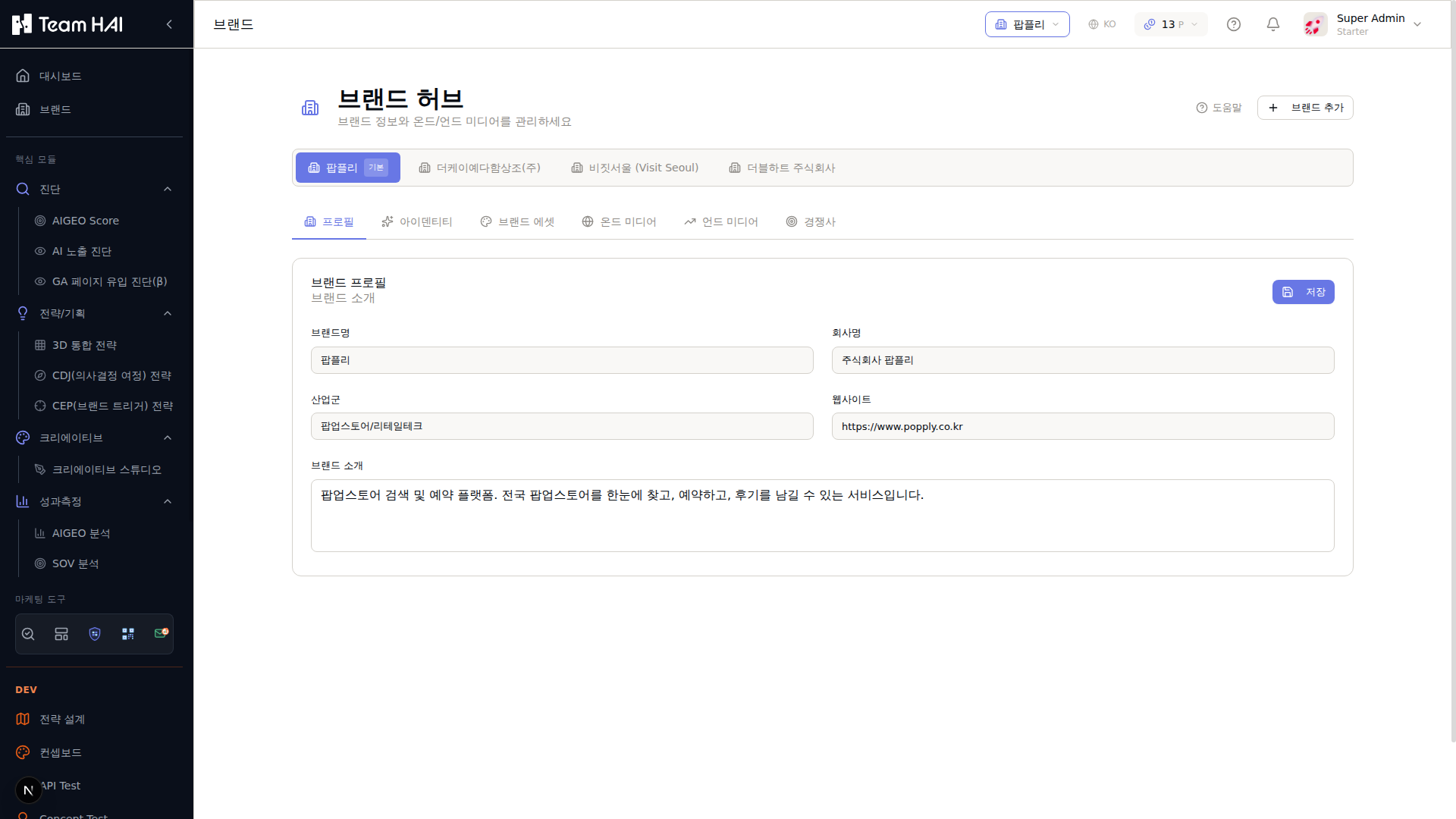
상단 드롭다운에서 관리할 브랜드를 선택합니다.
+ 브랜드 추가 버튼으로 새 브랜드를 생성합니다.
프로필 / 아이덴티티 / 브랜드 에셋 / 온드 미디어 / 언드 미디어 / 경쟁사 탭으로 이동합니다.
공식 명칭과 AI 인식용 별칭을 입력하는 필드입니다.
브랜드가 속한 업종을 선택합니다.
미디어 채널 등록
채널 탭으로 이동해 아래 미디어를 등록합니다.
- Owned Media: 웹사이트, 블로그, 공식 앱 URL
- Earned Media: 외부 언론/리뷰/커뮤니티 URL
- 소셜 채널: 인스타그램, 유튜브, 링크드인 계정
Owned Media에 등록한 URL은 진단 스캔 시 자동으로 분석 대상이 됩니다.
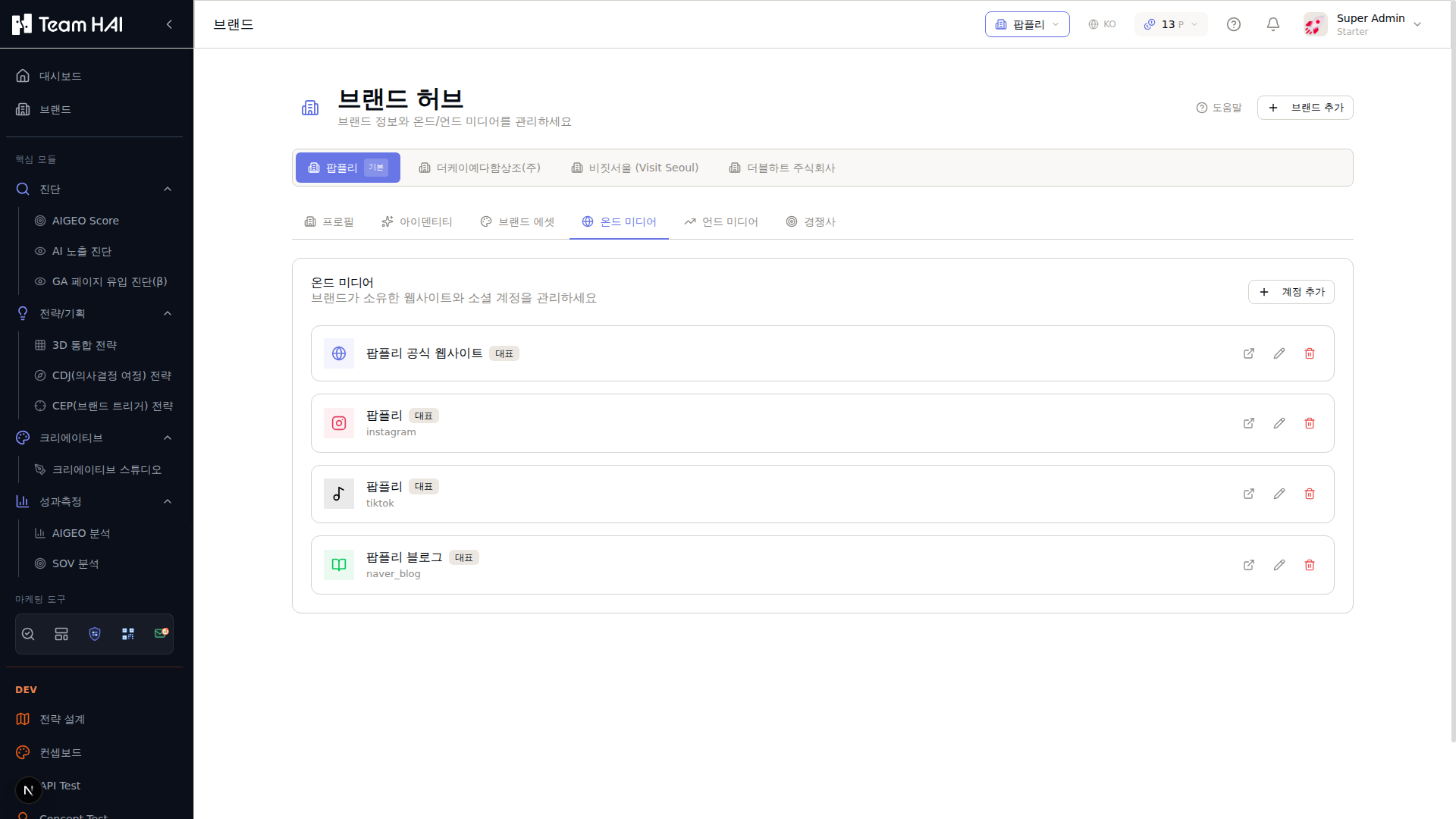
브랜드가 소유한 웹사이트·소셜 계정을 관리하는 탭입니다.
새 채널(웹사이트, Instagram, YouTube, 블로그 등)을 추가합니다.
대표 URL이 등록됩니다. 진단 스캔 시 자동 분석 대상이 됩니다.
Instagram, TikTok, 네이버 블로그 등 각 채널 유형 아이콘과 함께 표시됩니다.
경쟁사 등록
경쟁사 탭에서 SOV 비교 시 함께 측정할 경쟁 브랜드를 추가합니다.
- 경쟁사 브랜드명 입력
- 경쟁사 별칭 및 도메인 입력
- 비교 우선순위 설정
Register competitors to compare them under the same conditions. Check the number of comparison brands and scope.
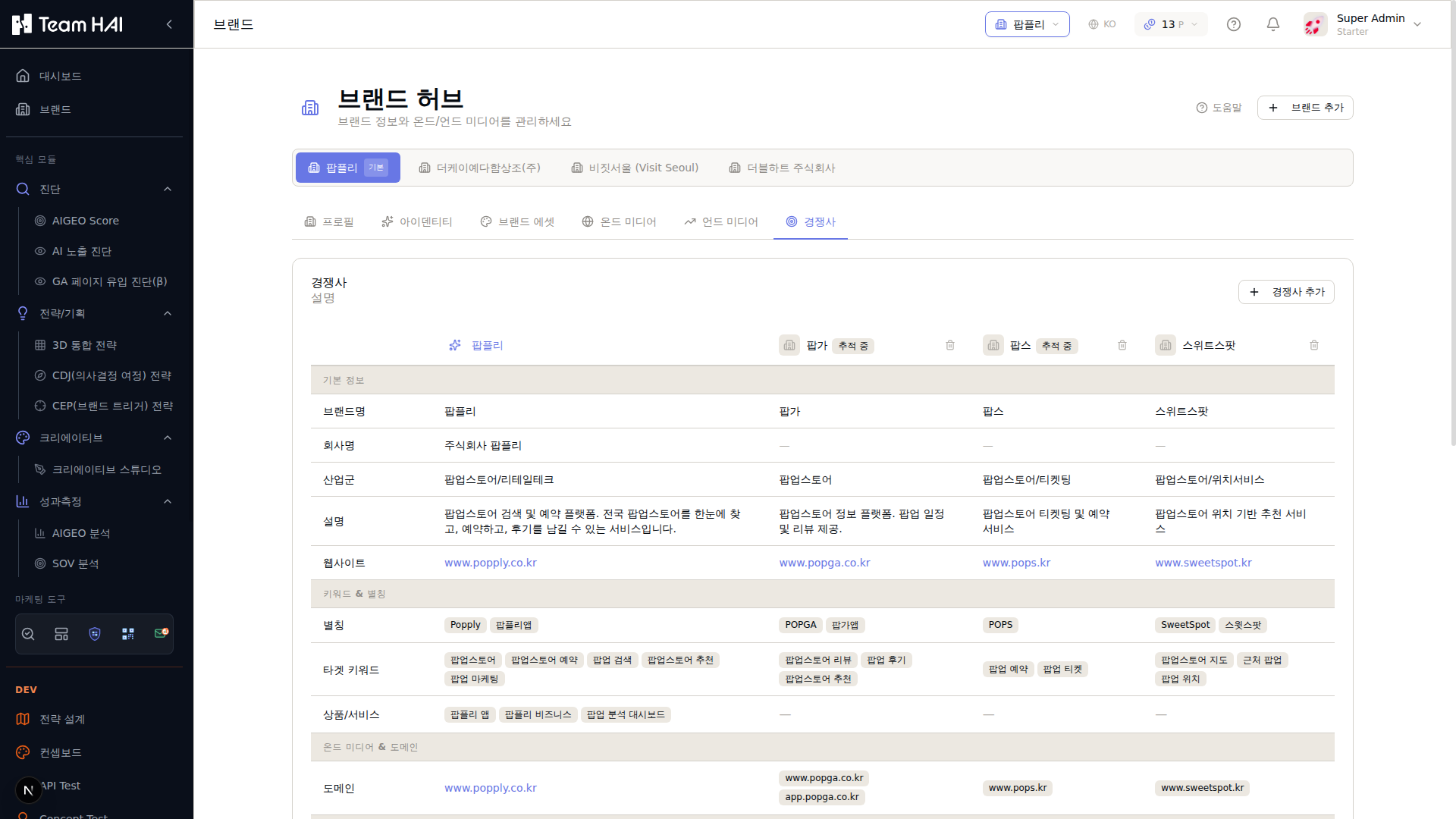
SOV 분석 시 비교할 경쟁 브랜드를 관리하는 탭입니다.
새 경쟁사를 추가합니다. 브랜드명, 도메인, 별칭, 키워드를 입력합니다.
현재 브랜드의 기본 정보가 첫 번째 열에 표시됩니다.
추가된 경쟁사들이 각 열에 표시됩니다. '추적 중' 배지는 SOV 모니터링 활성 상태입니다.
브랜드명, 별칭, 타겟 키워드, 상품/서비스, 온드 미디어 등을 항목별로 비교합니다.
저장 및 활성 브랜드 설정
'저장' 버튼을 클릭한 후, 상단 브랜드 선택기에서 지금 작업할 브랜드를 '활성 브랜드'로 설정합니다. 이후 모든 메뉴는 이 브랜드 기준으로 동작합니다.
브랜드 정보는 언제든지 수정 가능합니다. 정보를 업데이트한 후에는 다시 진단을 실행해 최신 상태를 반영하는 것을 권장합니다.
AIGEO 진단
웹사이트 URL을 입력하면 AI 검색엔진이 해당 페이지를 얼마나 잘 이해하고 인용할 수 있는지 자동으로 측정합니다. SEO·AEO·GEO 3가지 관점으로 종합 진단합니다.
정의
How easy this page is for search engines and AI to understand and use. A weighted combination of the stored SEO, AEO and GEO evaluations. See the result's formula for its weights. A diagnostic score out of 100, not a ranking or recommendation probability.
검색엔진 최적화
AI가 웹사이트에 접근·크롤링할 수 있는 기술 환경
AI 답변 엔진 최적화
AI가 콘텐츠를 이해하고 직접 인용할 수 있는가
생성형 AI 최적화
Making content easier for generative AI to understand and use as evidence.
Good
Needs improvement
Urgent improvement
주요 기능
3점수 통합 진단
SEO + AEO + GEO를 하나의 AIGEO Score로 종합합니다.
실시간 분석
URL 입력 즉시 AI 기반 진단을 시작합니다.
200+ 항목 점검
메타태그, 구조화데이터, 속도, 콘텐츠 등 200개 이상 항목을 자동 체크합니다.
공유 및 내보내기
진단 결과를 링크로 공유하거나 PDF로 저장합니다.
사용 설명 — 새 진단 실행
진단 메뉴 접속열기
Open Measure → Integrated Measurement and select the URL and measurement type. AI Diagnosis and GA Page Diagnosis are available separately under Diagnose.
+ 새 진단
새 진단 세션을 시작합니다. URL과 스캔 유형을 입력하는 패널이 열립니다.
AIGEO Score
0~100 사이의 종합 점수. 원형 게이지로 표시됩니다.
SEO / AEO / GEO 점수
세 가지 최적화 영역별 점수. 각각 클릭하면 세부 내역을 확인할 수 있습니다.
Priority 목록
개선 효과 순서로 정렬된 조치 항목 목록. 항목 클릭 시 상세 가이드가 표시됩니다.
CRITICAL 배지
즉시 해결 필요한 심각 이슈. 빨간색으로 표시됩니다.
WARNING 배지
개선 권장 이슈. 노란색으로 표시됩니다.
INFO 배지
참고용 추가 최적화 기회. 파란색으로 표시됩니다.
공유
진단 결과 링크를 클립보드에 복사합니다. 로그인 없이도 접근 가능한 링크가 생성됩니다.
PDF 저장
진단 결과를 PDF 파일로 다운로드합니다.
비교 분석
같은 URL의 이전 진단과 현재 결과를 나란히 비교합니다.
새 진단 시작
상단의 '+ 새 진단' 버튼을 클릭합니다. 진단 설정 패널이 열립니다.
URL 입력 및 스캔 유형 선택
진단할 웹사이트의 전체 URL을 입력합니다(https://로 시작). 스캔 유형을 선택합니다.
- Single Page: 특정 페이지 한 곳만 집중 진단
- Domain: 사이트맵 기반 전체 도메인 일괄 진단
처음에는 메인 페이지와 핵심 제품/서비스 페이지 2~3개로 시작하는 것을 권장합니다.
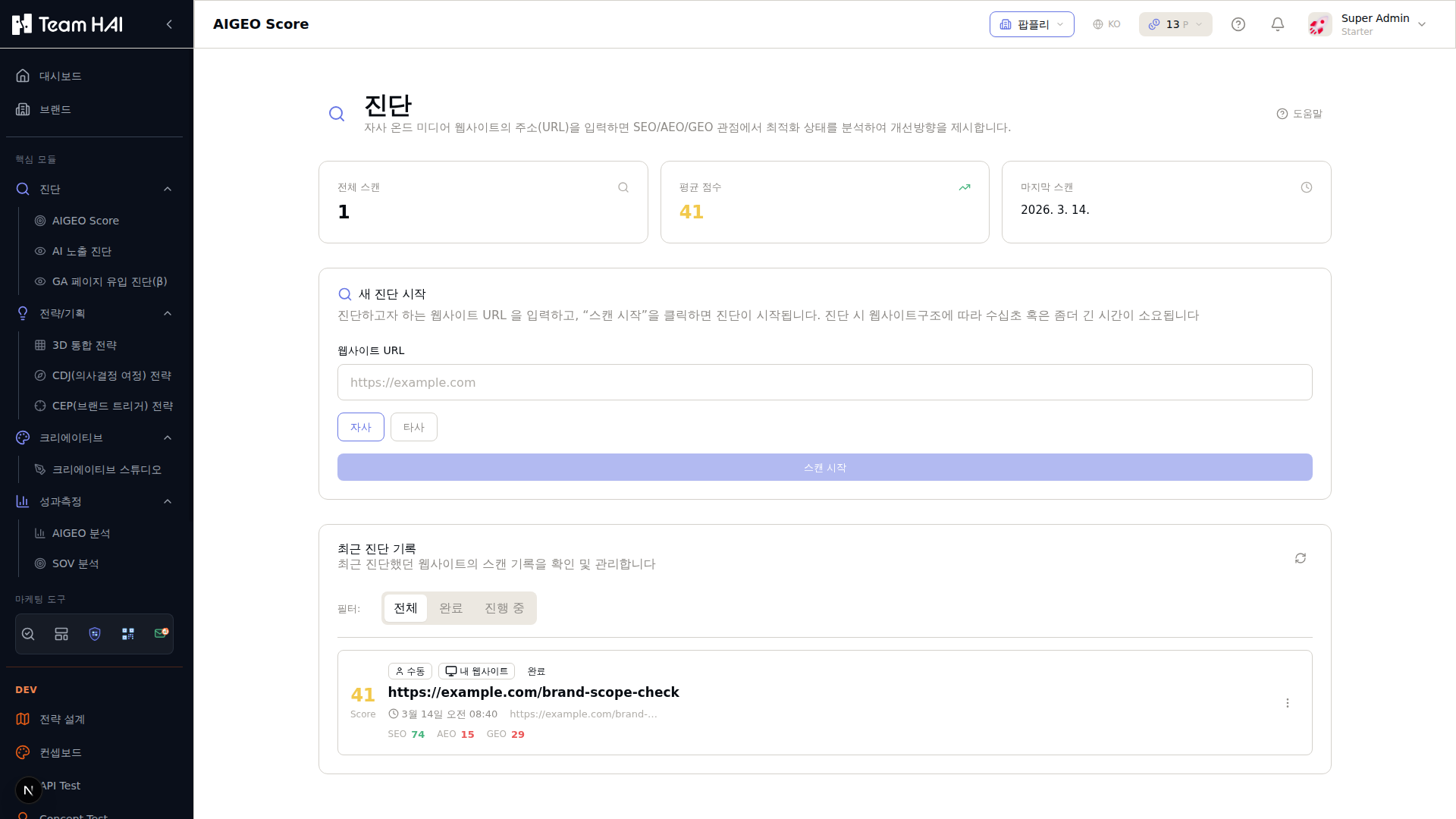
조직 내 누적 진단 횟수를 표시합니다.
전체 스캔의 평균 AIGEO Score (0~100).
가장 최근에 진단이 완료된 날짜입니다.
진단할 페이지 URL을 입력합니다. https://로 시작하는 전체 URL을 입력하세요.
자사 URL이면 '자사', 경쟁사 URL이면 '경쟁사'를 선택합니다.
과거 진단 결과 목록. 클릭하면 상세 리포트를 확인할 수 있습니다.
진단 실행
진단 설정 맨 아래 '새 진단' 버튼을 클릭합니다. URL당 약 1~2분이 소요됩니다. 진단 중에는 진행 상황이 실시간으로 표시됩니다.
결과 확인
진단이 완료되면 아래 섹션들이 표시됩니다.
- 종합 AIGEO Score (0~100)
- SEO / AEO / GEO 각 점수
- IS → TO BE 분석: 현재 상태와 목표 상태 비교
- Priority 목록: 개선 효과가 큰 순서대로 정렬된 우선 조치 항목
- 이슈 목록: CRITICAL / WARNING / INFO 심각도별 분류
- Lighthouse 리포트: 기술 성능 지표
- 콘텐츠 분석: AI 인용 가능성 분석
- 메타/구조 신호: 메타태그, 헤딩, 구조화데이터 분석
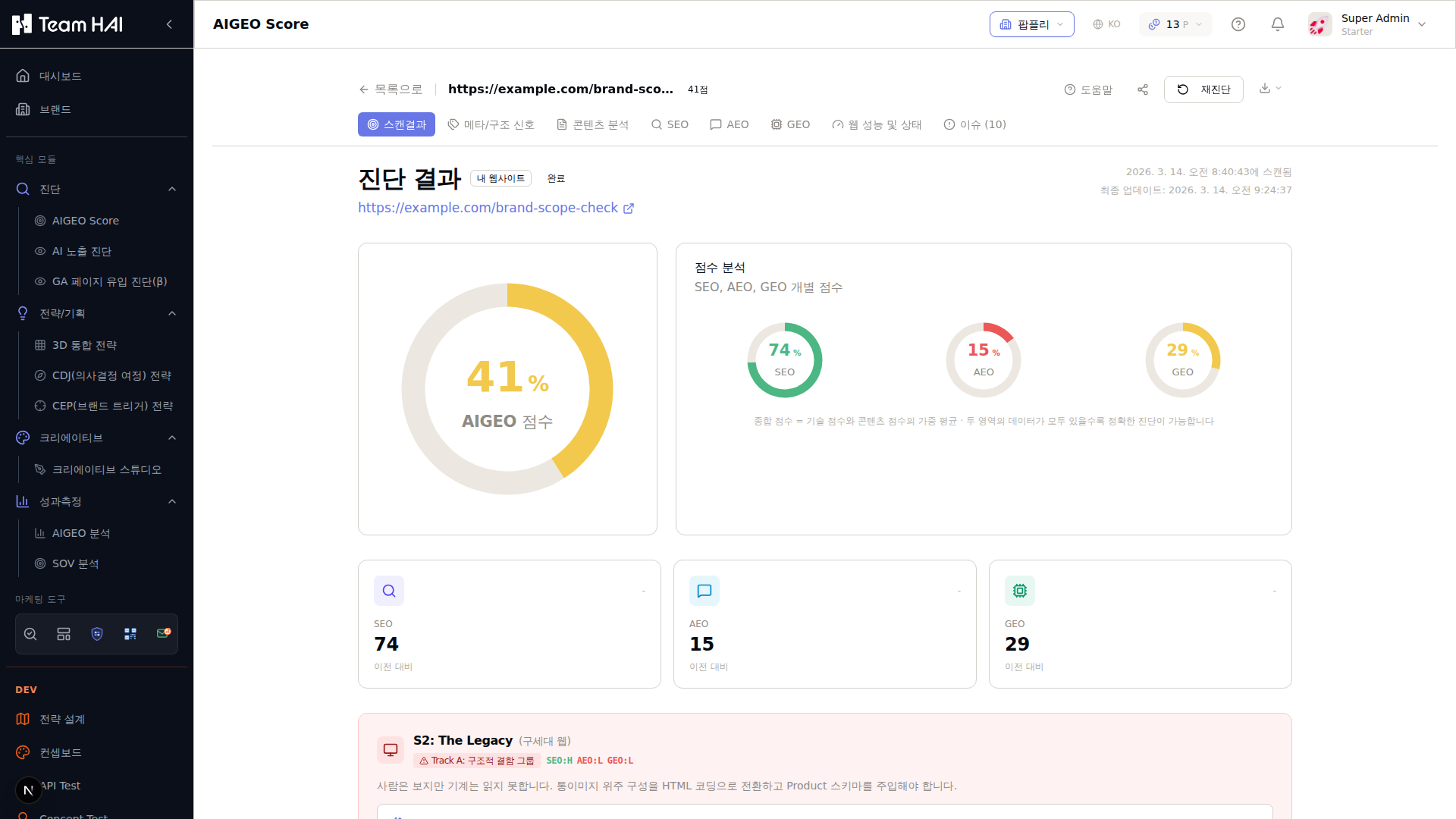
스캔결과 / 메타·구조신호 / 콘텐츠 분석 / SEO / AEO / GEO / 웹 성능 / 이슈 탭으로 이동합니다.
종합 점수(0~100)를 원형 게이지로 표시합니다. 41점 = 기본 단계.
세 영역 각 점수를 개별 게이지로 확인합니다.
검색엔진 최적화 점수 (74점). 클릭 시 세부 항목 확인.
AI 답변·생성형 AI 최적화 점수. 낮을수록 개선 우선순위가 높습니다.
S2 The Legacy — 브랜드 유형과 Track A/B 처방전이 표시됩니다.
이슈 조치
Priority 목록에서 CRITICAL 이슈부터 순서대로 개선 작업을 진행합니다. 각 이슈 항목에는 개선 방법 가이드가 포함되어 있습니다.
CRITICAL 이슈 하나를 해결하는 것이 INFO 이슈 10개 해결보다 점수에 더 큰 영향을 줍니다.
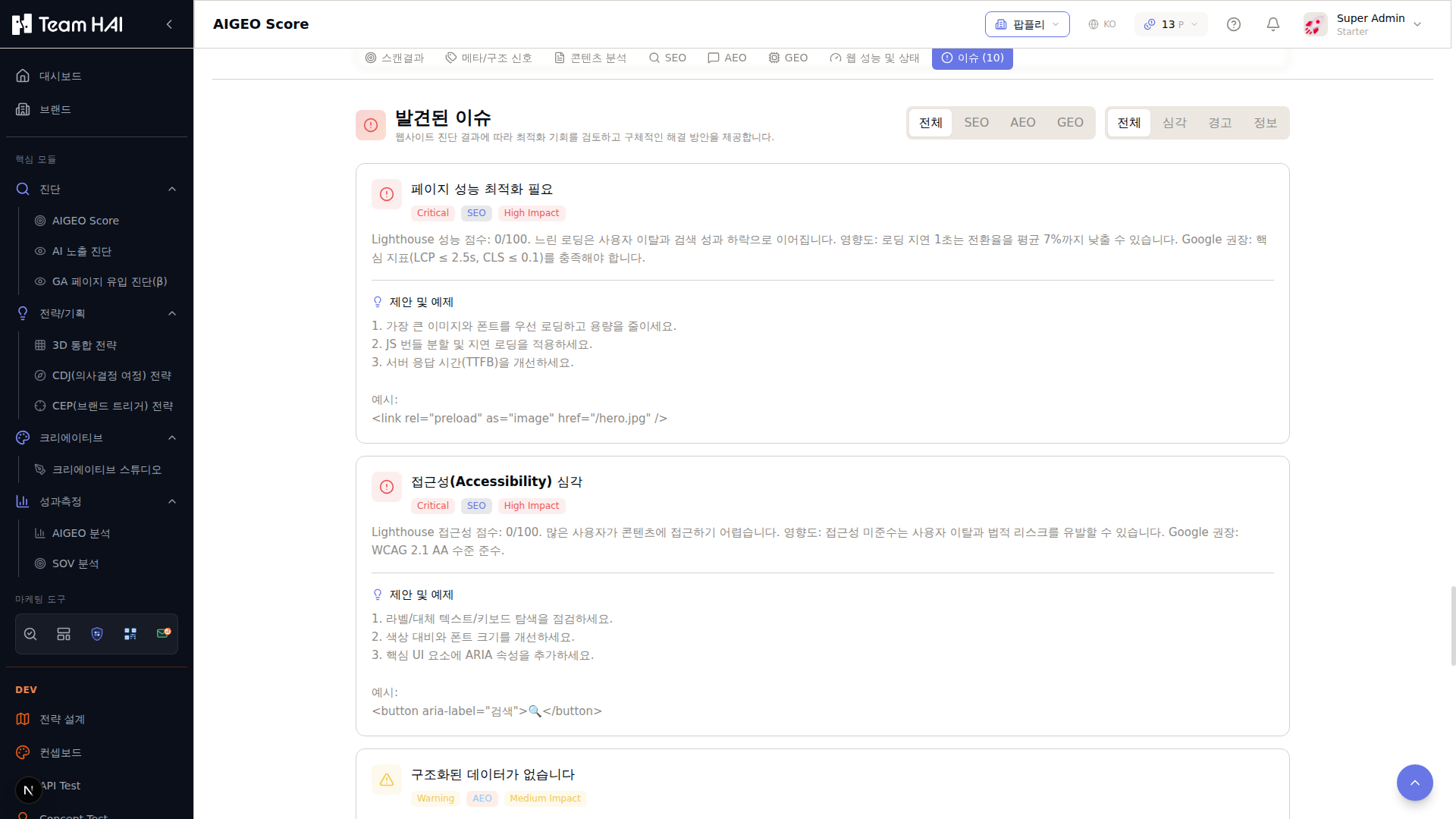
전체/SEO/AEO/GEO 및 심각/경고/정보 필터로 이슈를 분류합니다.
빨간색 배지. 즉시 해결이 필요한 최우선 이슈. 각 이슈에 개선 가이드와 예시 코드가 포함됩니다.
접근성·구조화 데이터 등 개선 권장 이슈. 노란색 배지로 표시됩니다.
결과 공유
우측 상단 '공유' 버튼으로 결과 링크를 복사하거나, 'PDF 저장' 버튼으로 리포트를 다운로드합니다.
Diagnosis scenarios — eight examples from the earlier interface
The eight cards below show the earlier classification. The current interface uses nine improvement types based on good, needs improvement and urgent SEO, AEO and GEO ratings. Check the current diagnosis and its evidence for the actual classification.
The Ghost
(디지털 유령)Track ASEO ↓ AEO ↓ GEO ↓
인터넷에 존재하지만 AI가 인식하지 못하는 상태
The Legacy
(구세대 웹)Track ASEO ↑ AEO ↓ GEO ↓
전통 검색은 잘 되지만 AI 최적화가 부재한 상태
The Social Star
(모래성)Track ASNS ↑ 자사몰 ↓
소셜은 강하지만 핵심 웹사이트가 취약한 상태
The Paradox
(고장난 명품)Track AAEO ↑ SEO ↓
콘텐츠는 좋지만 기술적 접근성이 부족한 상태
The Lab
(숨겨진 연구소)Track BSEO ↑ AEO ↑ GEO ↓
최적화는 잘 됐지만 외부 인지도가 부족한 상태
The Technician
(무명 배우)Track BAEO ↑ GEO 미진입
AI 인용은 되지만 브랜드 추천까지 이어지지 않는 상태
The Celebrity
(불친절한 거인)Track BGEO ↑ AEO ↓
브랜드 인지도는 높지만 AI 답변 활용도가 낮은 상태
The Leader
(시장 지배자)Track BSEO ↑ AEO ↑ GEO ↑
세 가지 모두 최적화된 이상적 상태
Track A — 구조 혁신
S1~S4 유형. SEO/AEO 개선 우선. 기존 웹사이트를 AI가 읽을 수 있는 구조로 전환하는 것이 핵심입니다.
Track B — 맥락 공략
S5~S8 유형. GEO/SOV 개선 우선. 경쟁사와의 Gap을 찾아 비교 콘텐츠를 제작하는 것이 핵심입니다.
전략 기획
진단으로 현황을 파악한 후, 어떤 전략으로 AI 최적화를 실행할지 설계하는 단계입니다. CEP를 통해 고객이 브랜드를 떠올리는 상황을 파악하고, CDJ로 구매 여정을 매핑합니다.
① 전략 매트릭스
전략 매트릭스 접속열기
왼쪽 메뉴 '기획(STRATEGIZE)' → '전략 매트릭스'를 클릭합니다.
브랜드 정보 검토
등록된 브랜드 정보(USP, 타깃 키워드, 경쟁사)를 검토합니다. 정보가 부족하면 먼저 브랜드 관리 메뉴에서 보완합니다.
전략 방향 설정
브랜드 목표(인지도 향상, 전환율 증대, 경쟁사 SOV 역전 등)를 선택합니다.
AI 전략 생성
'AI 전략 생성' 버튼을 클릭하면 브랜드 정보와 진단 결과를 바탕으로 맞춤형 전략 매트릭스가 자동 생성됩니다.
진단 완료 후 전략 매트릭스를 실행하면 훨씬 정확한 결과를 얻을 수 있습니다.
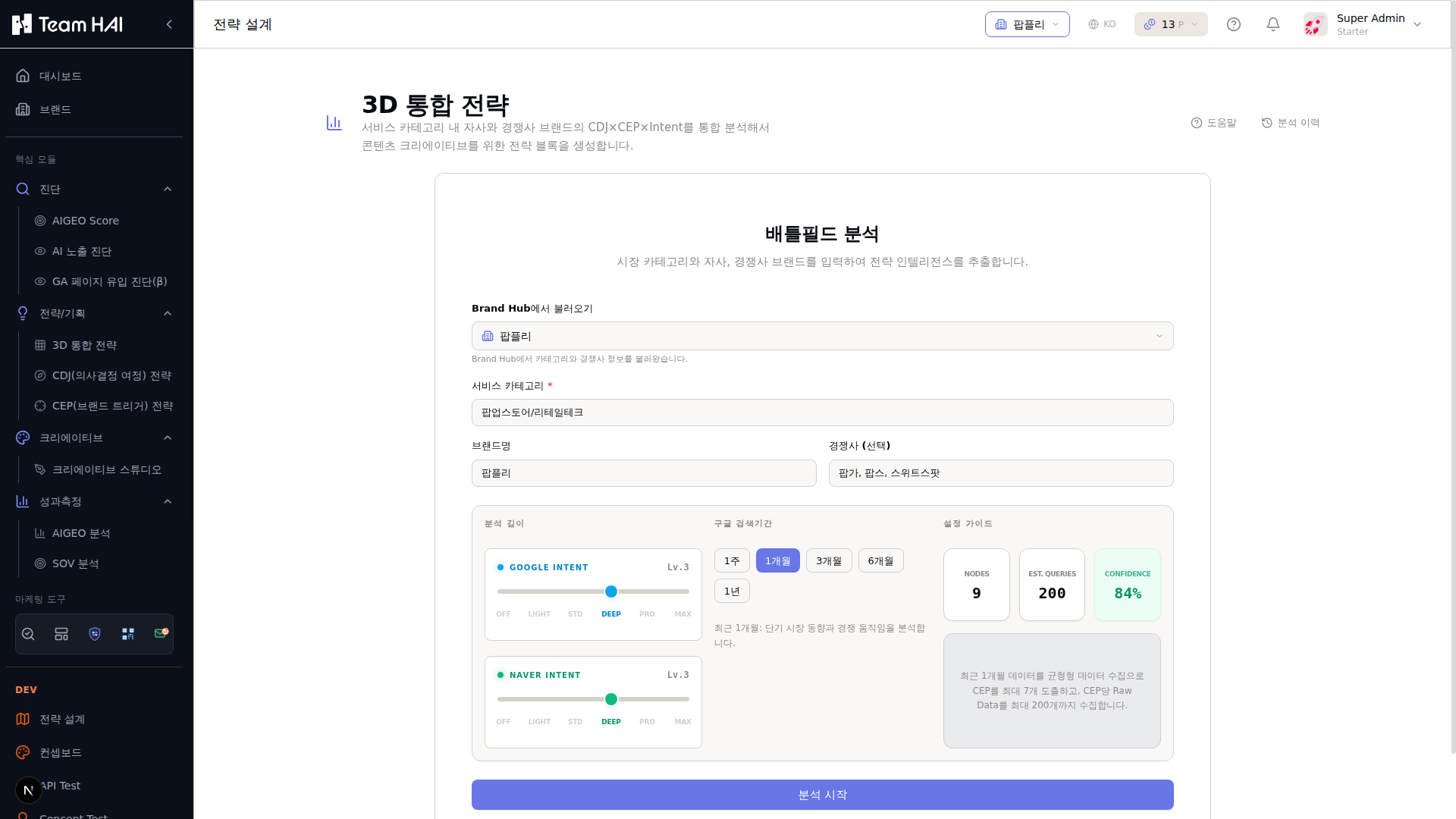
시장 카테고리, 브랜드명, 경쟁사를 입력합니다.
Google/Naver Intent 분석 깊이를 OFF~Max 6단계로 설정합니다.
1주~1년 기간을 선택해 최신/장기 트렌드를 분석합니다.
Nodes, 예상 쿼리 수, Confidence를 미리 확인합니다.
모든 설정 완료 후 클릭하면 AI 분석이 시작됩니다.
결과 검토 및 편집
생성된 전략 내용을 검토하고 실제 상황에 맞게 수정합니다. 전략 내용은 이후 CDJ·CEP 분석에 자동으로 반영됩니다.
② CDJ (고객 구매 여정)
여정 단계 시각화
고객이 거치는 모든 단계를 시각적 맵으로 표현합니다.
접점 매핑
각 단계에서 고객이 브랜드와 만나는 채널과 콘텐츠를 매핑합니다.
AI 노출 전략
각 여정 단계에서 AI가 브랜드를 추천하도록 최적화 방향을 설정합니다.
콘텐츠 니즈 도출
단계별 필요한 콘텐츠 유형과 주제를 자동 제안합니다.
CDJ 메뉴 접속열기
왼쪽 메뉴 '기획(STRATEGIZE)' → 'CDJ 분석'을 클릭합니다.
고객 페르소나 선택
분석할 타깃 고객 유형(페르소나)을 선택합니다. 페르소나는 브랜드 설정에서 사전에 등록한 내용이 불러와집니다.
여정 단계 설정
브랜드 특성에 맞는 구매 여정 단계를 정의합니다. 기본 제공 템플릿(B2C 일반, B2B, SaaS 등)을 선택하거나 커스텀 설정합니다.
AI CDJ 분석 실행
'AI 분석' 버튼을 클릭하면 각 단계별 고객 니즈, 검색 질문, 경쟁 현황이 자동 분석됩니다.
AI 분석 실행 전 CEP 데이터가 있으면 더 정교한 결과를 얻을 수 있습니다.
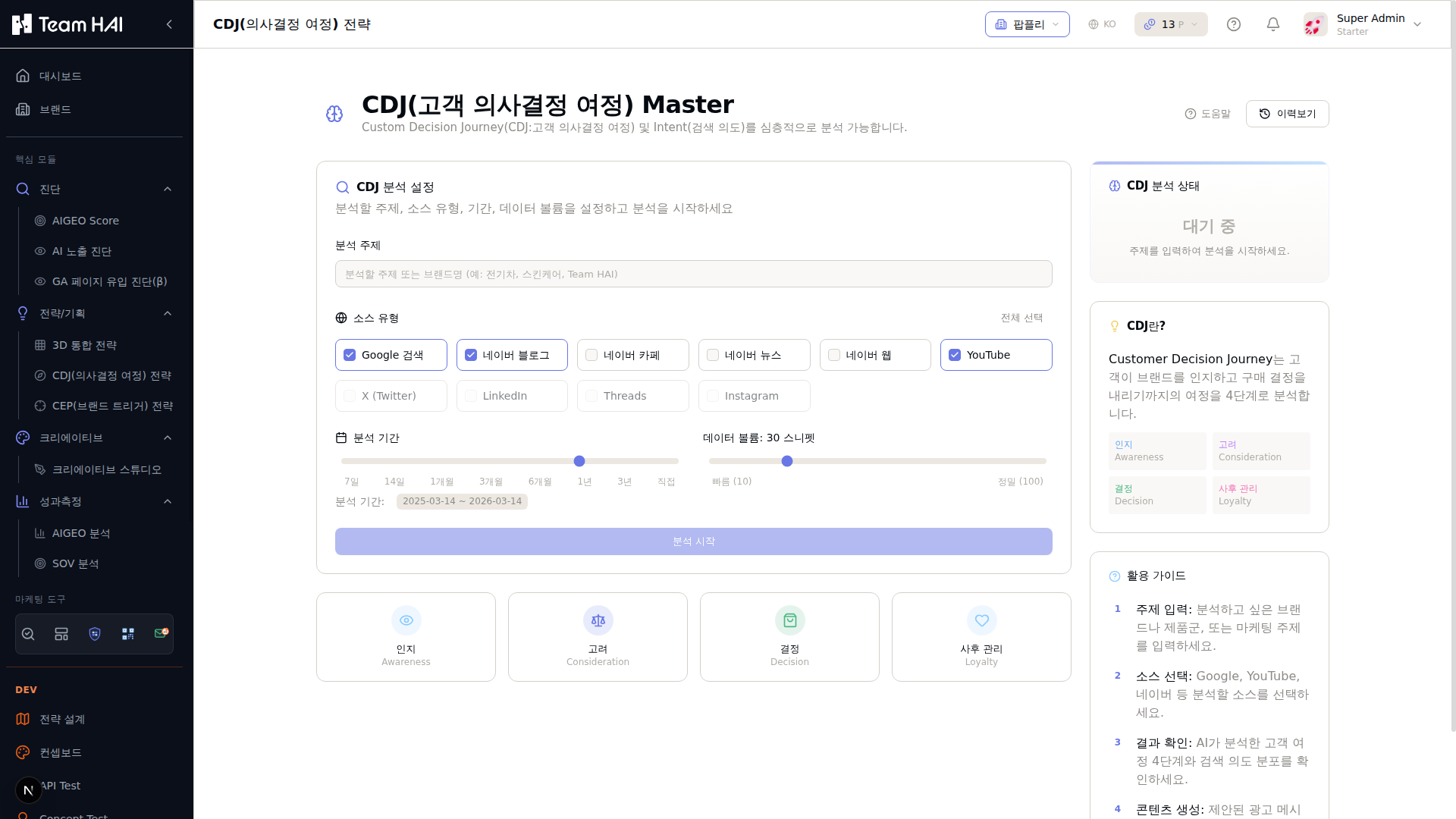
분석할 브랜드명 또는 제품/서비스 키워드를 입력합니다.
Google, 네이버 블로그, YouTube 등 데이터 소스를 선택합니다.
7일~3년 범위에서 분석 기간을 설정합니다.
수집할 스니펫 수(10~100)를 조절합니다. 많을수록 정밀하지만 시간이 걸립니다.
인지 → 고려 → 결정 → 사후관리 4단계 구조를 미리 확인합니다.
단계별 콘텐츠 전략 확인
각 여정 단계에서 필요한 콘텐츠 주제, 형식, 채널이 추천됩니다. 이 결과를 콘텐츠 단계에서 활용합니다.
③ CEP 최적화
CEP 최적화 메뉴 접속열기
왼쪽 메뉴 '기획(STRATEGIZE)' → 'CEP 최적화'를 클릭합니다.
CEP 발굴
AI가 브랜드 카테고리의 주요 진입 상황을 자동으로 분석해 목록을 생성합니다.
CEP 카드
개별 CEP 항목. 상황 설명, 관련 검색 질문, 예상 전환율, 현재 AI SOV가 표시됩니다.
우선순위 설정
CEP의 공략 우선순위를 드래그로 순서를 변경합니다.
콘텐츠 전략 설정
선택한 CEP에 맞는 콘텐츠 방향성을 설정하는 패널을 엽니다.
SOV 현황
이 CEP에서 내 브랜드와 경쟁사의 현재 AI 점유율을 표시합니다.
CEP 자동 발굴
'CEP 발굴' 버튼을 클릭합니다. AI가 브랜드 카테고리에서 고객이 가장 자주 검색하는 상황을 분석해 CEP 목록을 생성합니다.
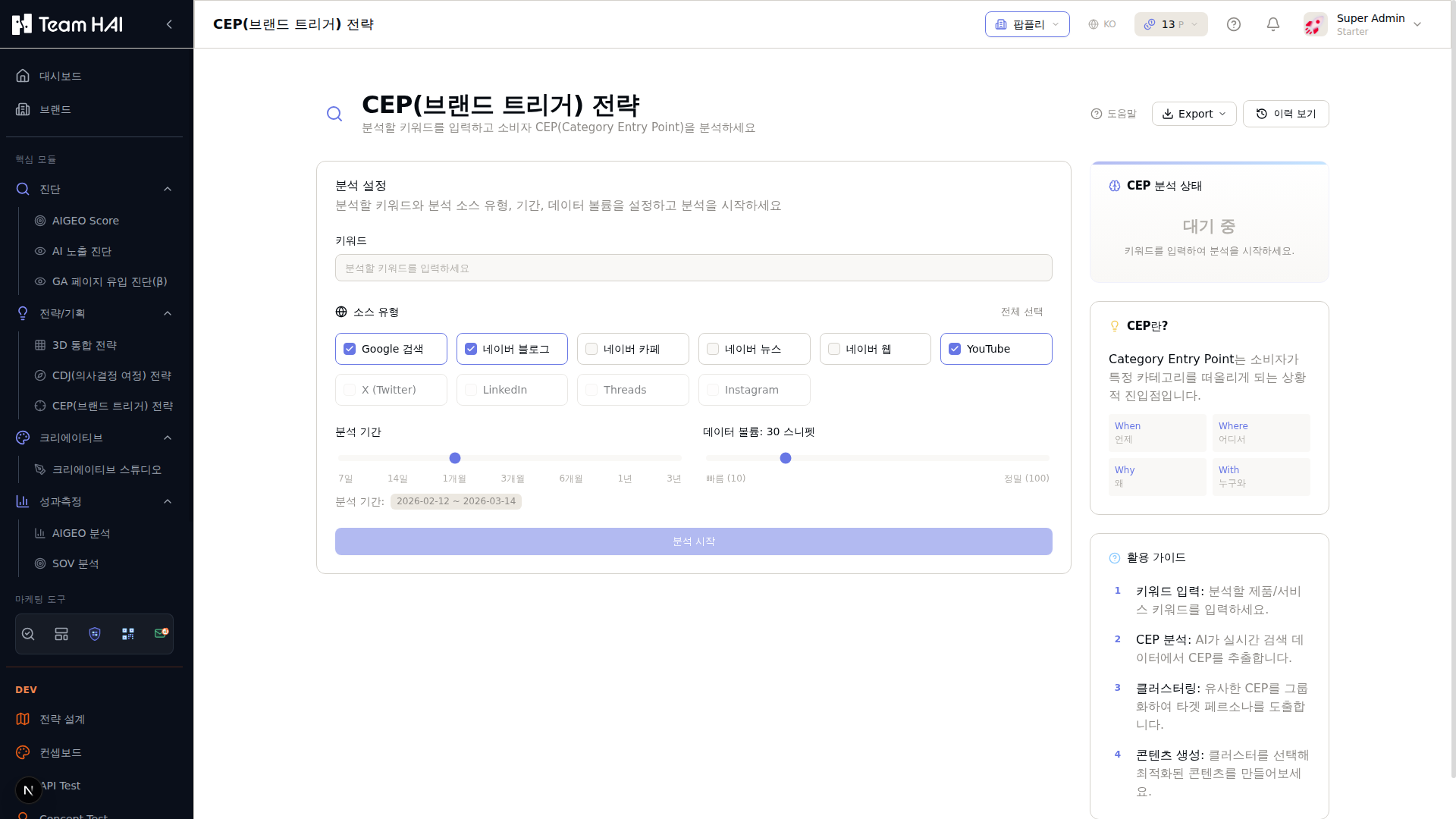
분석할 제품/서비스 카테고리 키워드를 입력합니다.
CEP 추출에 사용할 플랫폼을 선택합니다.
기간을 설정합니다. 기본값은 1개월입니다.
When(언제) / Where(어디서) / Why(왜) / With(누구와) 관점을 안내합니다.
CEP 검토 및 선택
발굴된 CEP 목록을 검토하고 브랜드와 관련성 높은 CEP를 선택합니다. 커스텀 CEP를 직접 추가할 수도 있습니다.
우선순위 설정
전환 효과가 높을 것으로 예상되는 CEP부터 우선순위를 설정합니다. 현재 AI SOV가 낮은 CEP를 우선 공략하는 것이 효과적입니다.
SOV 모니터링 데이터와 연계하면 어떤 CEP에서 경쟁사가 강한지 파악할 수 있습니다.
CEP별 콘텐츠 전략 수립
각 CEP에 맞는 콘텐츠 주제와 형식을 설정합니다. 이 데이터는 콘텐츠 생성 시 자동으로 참조됩니다.
전략 기획 3가지 도구(전략 매트릭스 → CDJ → CEP)를 순서대로 진행하면 콘텐츠 단계에서 어떤 콘텐츠를 만들어야 할지 명확한 방향이 생깁니다.
콘텐츠
전략 수립 후 실제 콘텐츠를 AI로 생산하는 단계입니다. 블로그, 소셜 미디어, 보도자료, LLMs.txt 등 다양한 형식의 콘텐츠를 AI로 빠르게 생성합니다.
정의
주요 기능
블로그 생성
SEO/AEO 최적화된 블로그 포스트를 자동 작성합니다.
SNS 콘텐츠
인스타그램, 유튜브, 링크드인 등 플랫폼별 최적화 콘텐츠를 생성합니다.
보도자료
언론이 활용할 수 있는 형식의 공식 보도자료를 작성합니다.
LLMs.txt
AI 크롤러를 위한 브랜드 공식 정보 파일을 자동 생성합니다.
이미지 생성
브랜드 아이덴티티에 맞는 마케팅 이미지를 AI로 생성합니다.
영상 스크립트
마케팅 영상의 스크립트와 콘텐츠 방향을 AI로 제작합니다.
사용 설명 — 콘텐츠 스튜디오
콘텐츠 스튜디오 접속열기
왼쪽 메뉴 '콘텐츠(CREATE)' → '콘텐츠 스튜디오'를 클릭합니다.
콘텐츠 유형 선택
블로그, 소셜, 보도자료, LLMs.txt, 이미지 중 생성할 유형을 선택합니다.
주제/키워드 입력
콘텐츠가 다룰 핵심 주제나 타깃 키워드를 입력합니다.
CEP 연결
이 콘텐츠가 어떤 고객 상황(CEP)을 공략하는지 선택합니다. CEP 데이터가 자동으로 활용됩니다.
생성
설정된 조건에 맞는 콘텐츠를 AI로 생성합니다.
재생성
같은 설정으로 새로운 버전의 콘텐츠를 다시 생성합니다.
AI 최적화 점수
생성된 콘텐츠가 AI에게 인용될 가능성을 0~100으로 표시합니다.
내보내기
콘텐츠를 Markdown, HTML, 일반 텍스트 형식으로 다운로드합니다.
콘텐츠 라이브러리
생성된 콘텐츠 목록. 날짜, 유형, 키워드로 필터링할 수 있습니다.
콘텐츠 유형 선택
생성할 콘텐츠 유형을 선택합니다.
- 블로그 포스트: SEO/AEO 최적화된 긴 형식 글
- 소셜 미디어: 인스타그램/링크드인/트위터 형식 포스트
- 보도자료: 언론 배포용 공식 형식
- LLMs.txt: AI 크롤러용 브랜드 정보 파일
- 이미지: 마케팅용 비주얼 생성
콘텐츠 설정 입력
콘텐츠 방향을 설정합니다.
- 주제/키워드: 콘텐츠가 다룰 핵심 주제
- 타깃 CEP: 어떤 구매 상황을 공략하는 콘텐츠인지
- Tone of Voice: 브랜드 설정에서 자동 불러옴
- 길이/형식: 단문/장문, 리스트형/에세이형 등
- 타깃 독자: 초보자/전문가, 연령층 등
CEP와 CDJ 분석 결과가 있으면 자동으로 권장 주제가 제안됩니다.
AI 콘텐츠 생성
'생성' 버튼을 클릭합니다. AI가 브랜드 정보와 설정을 기반으로 콘텐츠를 작성합니다. 약 30초~2분이 소요됩니다.
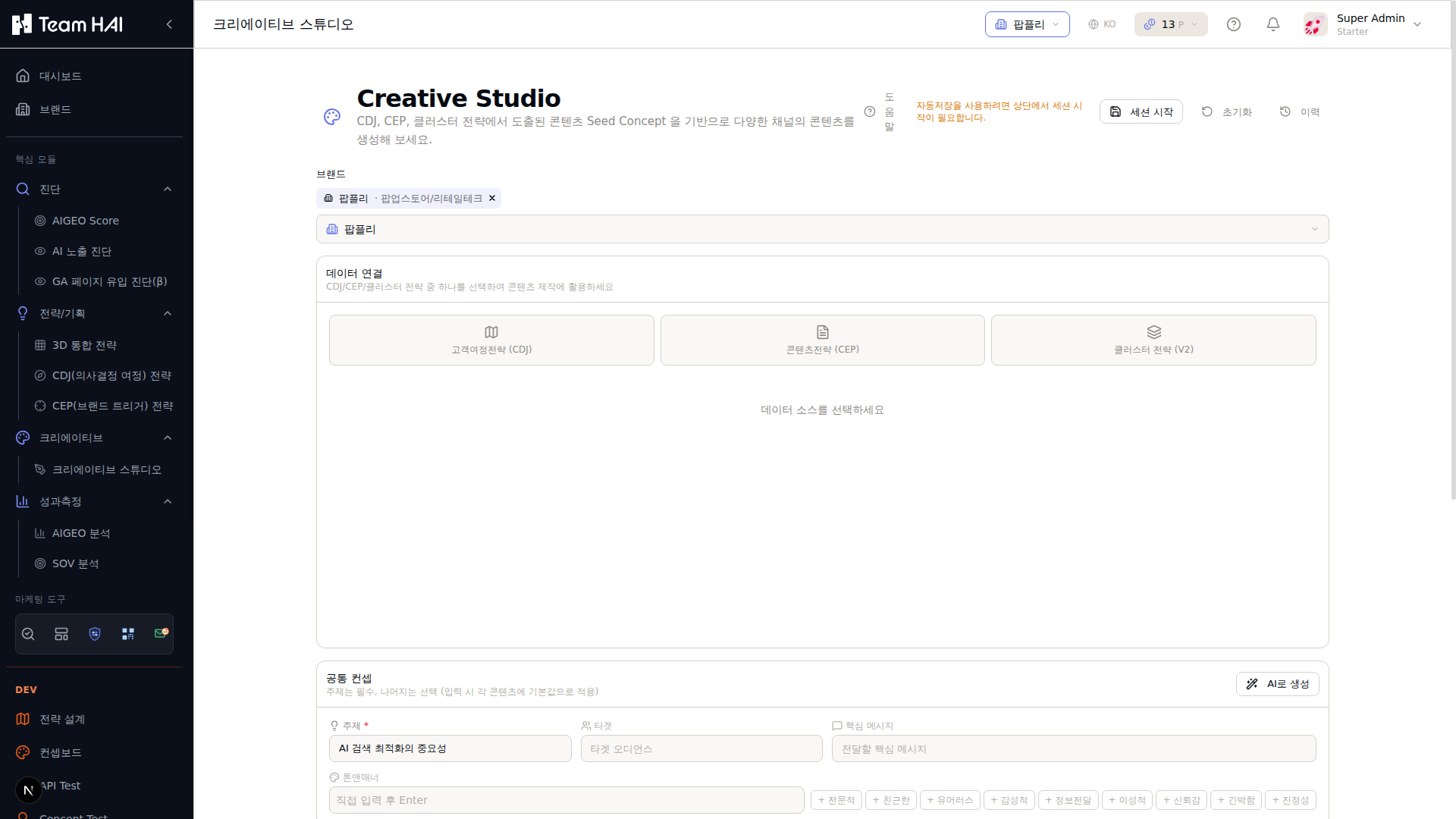
블로그, 소셜, 보도자료, LLMs.txt, 이미지 중 생성할 유형을 선택합니다.
현재 선택된 브랜드 정보(팝플리)가 자동으로 콘텐츠 생성에 활용됩니다.
콘텐츠가 다룰 핵심 주제나 타깃 키워드를 입력합니다.
이 콘텐츠가 어떤 고객 상황(CEP)을 공략하는지 선택합니다.
설정된 조건으로 AI가 브랜드 최적화된 콘텐츠를 생성합니다.
기존에 생성된 콘텐츠 목록을 날짜/유형/키워드로 필터링합니다.
결과 검토 및 편집
생성된 콘텐츠를 검토합니다. 인라인 에디터에서 직접 수정할 수 있습니다.
- AI 최적화 점수 확인: 생성된 콘텐츠의 AI 인용 가능성 점수
- SEO 점수 확인: 검색 최적화 수준
- 개선 제안 반영: AI가 제안하는 추가 최적화 항목 확인
콘텐츠 저장 및 활용
'저장' 버튼으로 콘텐츠 라이브러리에 저장합니다. '복사', '내보내기(MD/HTML/텍스트)' 기능으로 원하는 플랫폼에 게시합니다.
AI 생성 콘텐츠는 반드시 사람이 검토해야 합니다. 브랜드 정보가 정확하게 등록되어 있어도 AI가 잘못된 정보를 포함할 수 있습니다(할루시네이션). 게시 전 항상 사실 확인을 하세요.
콘텐츠를 생성할 때 CEP를 연결하면 AI가 해당 구매 상황에서 더 효과적인 내용을 작성합니다. CEP 1개당 콘텐츠 3개 이상을 제작하면 해당 상황에서 AI 추천률이 높아집니다.
성과 측정
진단·전략·콘텐츠 실행 후 효과를 수치로 확인하는 단계입니다. AIGEO Score 변화, AI 검색 SOV, 트래픽 등을 통합 대시보드에서 추적합니다.
① AIGEO 모니터링
자동 반복 스캔
일/주/월 단위로 자동 측정을 예약합니다.
트렌드 분석
점수 변화를 시계열 그래프로 시각화합니다.
알림 설정
점수가 기준 이하로 떨어지면 즉시 알림을 받습니다.
경쟁사 비교
경쟁사 URL도 함께 모니터링해 상대적 위치를 추적합니다.
AIGEO 모니터링 접속열기
왼쪽 메뉴 '성과측정(MEASURE)' → 'AIGEO 모니터링'을 클릭합니다.
+ 새 프로젝트
새 모니터링 프로젝트를 생성합니다. URL, 스캔 주기, 경쟁사를 설정합니다.
지금 측정
스케줄을 기다리지 않고 즉시 측정을 실행합니다.
점수 변화 그래프
시간에 따른 AIGEO/SEO/AEO/GEO 점수 변화를 선 그래프로 표시합니다.
비교 분석
선택한 두 측정 회차를 나란히 비교해 변화된 항목을 파악합니다.
알림 설정
점수 임계값 설정 및 알림 수신 방법(이메일, Slack)을 설정합니다.
PDF 저장
측정 결과와 트렌드를 포함한 리포트를 PDF로 저장합니다.
새 모니터링 프로젝트 생성
'+ 새 프로젝트' 버튼을 클릭합니다. 모니터링할 URL(들)을 입력합니다. 경쟁사 URL도 함께 추가하면 비교 분석이 가능합니다.
도메인 전체(예: example.com)를 등록하면 sitemap 기반으로 주요 페이지를 자동 수집합니다.
스캔 주기 설정
자동 반복 측정 주기를 설정합니다. 매일/매주/격주/매월 중 선택합니다. 콘텐츠 발행 주기에 맞게 설정하는 것이 좋습니다.
일반적으로 매주 1회가 적절합니다. 변화가 잦은 경쟁 시장이라면 매일 측정을 권장합니다.
첫 번째 측정 실행
'지금 측정' 버튼으로 즉시 첫 번째 측정을 실행합니다. 이 결과가 베이스라인(기준점)이 됩니다.
알림 규칙 설정
'알림 설정'에서 점수가 기준 이하로 떨어질 때 이메일 알림을 설정합니다. 예: 'AIGEO Score 70 이하 시 알림'.
트렌드 분석
시간이 지나면 점수 변화 그래프에서 개선/악화 추이를 확인합니다. 개선 작업 후 수동 측정을 실행하면 이전 결과와 자동 비교됩니다.
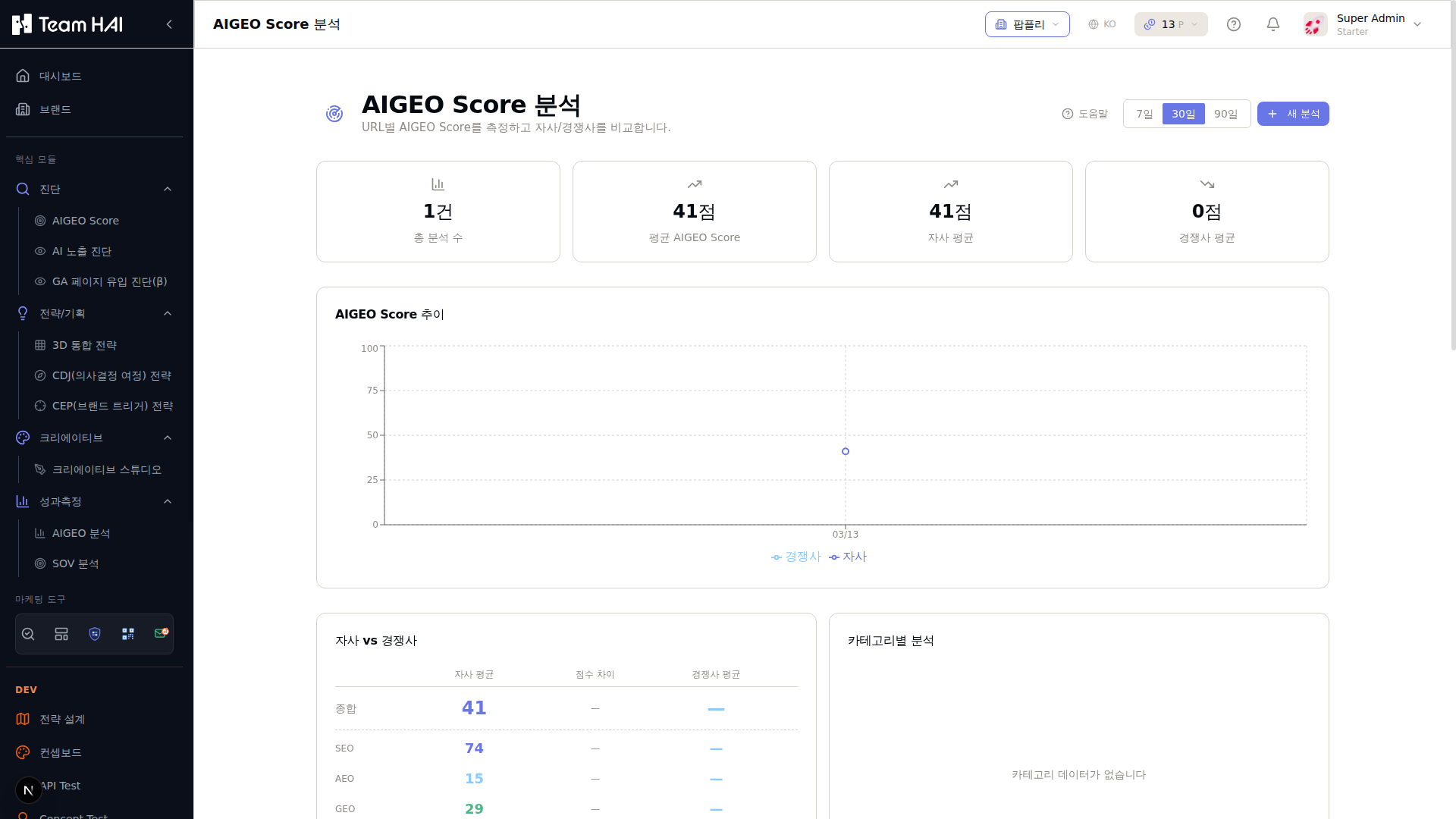
자사 평균 점수와 전체 평균을 한눈에 확인합니다. (예: 41점)
총 스캔 횟수와 최근 측정 일자를 보여줍니다.
시간에 따른 AIGEO/SEO/AEO/GEO 점수 변화를 시계열로 표시합니다.
기술 최적화, 콘텐츠 품질, 구조화 데이터 등 세부 항목 점수를 확인합니다.
날짜별 측정 이력을 클릭해 상세 진단 결과를 비교 분석합니다.
② SOV 모니터링
경쟁사 사전 등록 확인열기
Competitor comparison: compare exposure under the same questions and platforms.
Register competitors to compare them under the same conditions. Check the number of comparison brands and scope.
SOV 프로젝트 생성열기
'성과측정' → 'SOV 모니터링' → '+ 새 프로젝트'를 클릭합니다. 측정할 브랜드, 경쟁사, AI 플랫폼, 페르소나를 설정합니다.
- AI 플랫폼: ChatGPT / Gemini / Perplexity 중 선택
- 페르소나: 구매자, 전문가, 입문자 등 고객 유형 선택
+ 새 프로젝트
SOV 측정 프로젝트를 생성합니다. 브랜드, 경쟁사, 플랫폼, 페르소나를 설정합니다.
측정 시작
설정된 질문들을 AI 플랫폼에 일괄 질의해 SOV를 측정합니다.
SOV 게이지
SOV score: a 0–100 composite of mention, position, sentiment and source signals in this run. Review mention rate separately.
경쟁사 비교 차트
내 브랜드와 등록된 경쟁사들의 SOV를 막대 차트로 비교합니다.
질문별 분석
각 CEP 질문에서 브랜드가 어떻게 언급되었는지 상세 결과를 보여줍니다.
감성 분석
AI 응답에서 내 브랜드에 대한 긍정/중립/부정 언급 비율을 보여줍니다.
스케줄 설정
SOV 측정을 정기적으로 자동 실행하도록 예약합니다.
측정 질문(CEP) 설정
AI에게 던질 질문 목록을 설정합니다. CEP 분석 결과에서 자동 가져오거나 직접 입력합니다.
실제 고객이 AI에게 물어볼 법한 구체적인 상황 질문이 효과적입니다. 예: '헬스케어 앱 추천해줘', '다이어트 시작할 때 도움 되는 앱은?'
SOV 측정 실행
'측정 시작' 버튼을 클릭합니다. 설정된 질문들을 AI 플랫폼에 일괄 질의해 브랜드 언급률을 측정합니다.
결과 분석
측정 완료 후 아래 데이터를 확인합니다.
- SOV score: a 0–100 composite of mention, position, sentiment and source signals in this run. Review mention rate separately.
- 언급 위치: 응답의 몇 번째에 언급되는지
- 감성 분석: 긍정/중립/부정 언급 비율
- Competitor comparison: compare exposure under the same questions and platforms.
- 질문별 분석: 어떤 질문에서 강하고 약한지
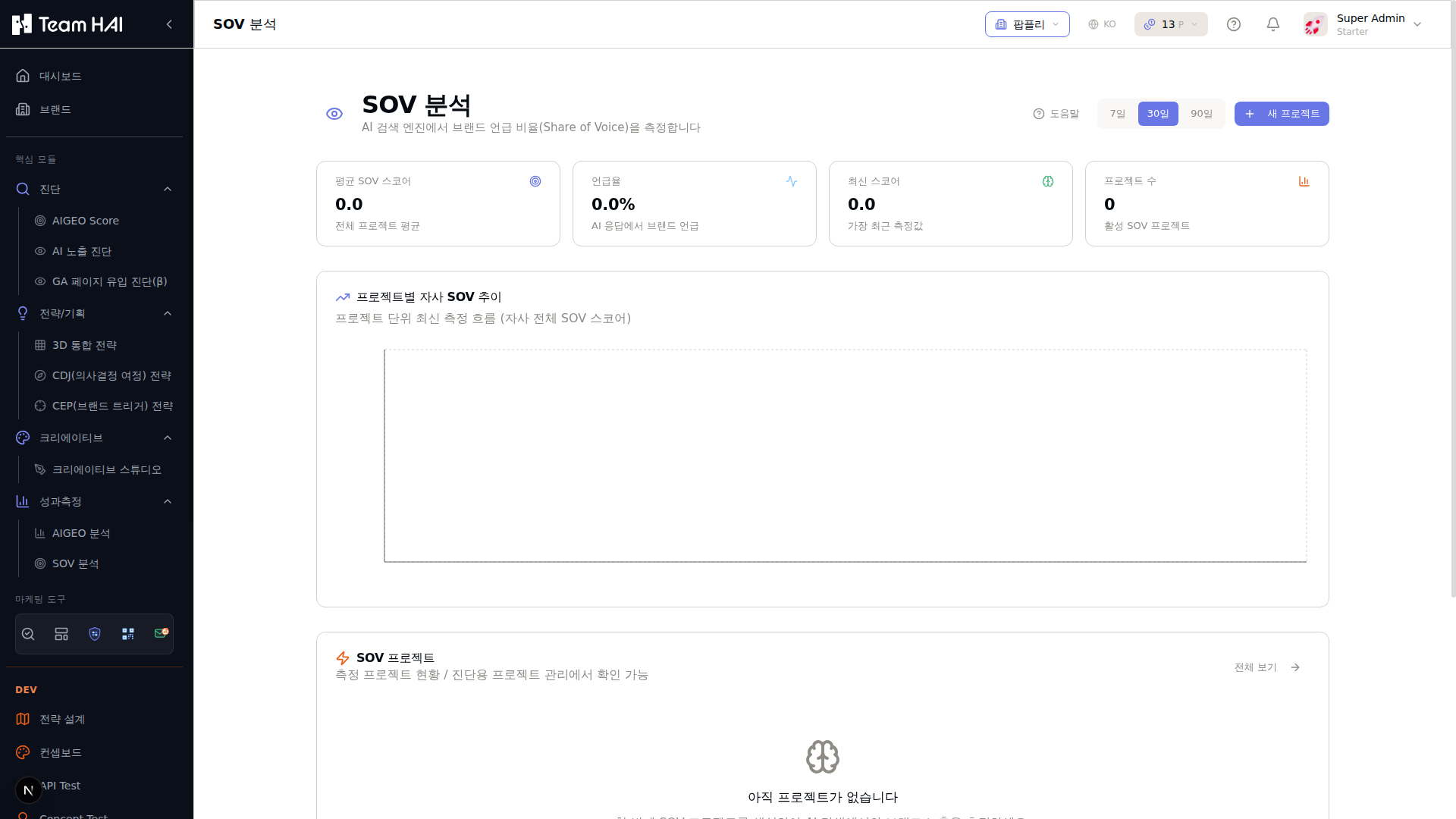
생성된 SOV 모니터링 프로젝트 목록입니다. 각 프로젝트별 현황을 확인합니다.
새 SOV 측정 프로젝트를 생성합니다. 브랜드, 경쟁사, AI 플랫폼을 설정합니다.
Shows changes in the Team HAI composite SOV score over time. It differs from mention rate.
내 브랜드와 경쟁사들의 SOV를 막대 차트로 비교합니다.
각 CEP 질문에서 브랜드가 어떻게 언급되었는지 상세 결과를 보여줍니다.
개선 전략 수립
SOV가 낮은 질문 유형에서 내 브랜드가 언급되지 않는 이유를 파악하고, 해당 CEP에 맞는 콘텐츠를 콘텐츠 단계에서 생성합니다.
③ 분석 대시보드
분석 대시보드 접속열기
왼쪽 메뉴 '성과측정(MEASURE)' → '분석'을 클릭합니다.
기간 선택기
분석 기간을 설정합니다. 지난 7일/30일/90일 또는 날짜 범위를 직접 입력합니다.
지표 요약 카드
AIGEO Score, SOV, 트래픽, 콘텐츠 수의 현재 값과 이전 기간 대비 변화를 보여줍니다.
트렌드 차트
기간 내 주요 지표의 시계열 변화를 선 그래프로 표시합니다.
리포트 생성
선택 기간의 성과를 종합한 PDF/Excel 리포트를 자동 생성합니다.
내보내기
데이터를 CSV, Excel 형식으로 내보냅니다.
기간 설정
상단 날짜 선택기에서 분석할 기간을 설정합니다. 지난 7일/30일/90일/사용자 지정 중 선택합니다.
주요 지표 확인
요약 카드에서 핵심 지표 변화를 확인합니다.
- AIGEO Score 변화: 이전 기간 대비 점수 변화
- SOV 변화: AI 검색 점유율 변화
- AI 검색 유입: AI 검색에서 유입된 트래픽
- 콘텐츠 발행 수: 기간 내 생성된 콘텐츠 수
세부 분석 확인
각 섹션을 클릭해 세부 분석을 확인합니다.
- 채널별 성과: Owned/Earned/Paid 미디어별 기여도
- 키워드 성과: AI 검색에서 효과적인 키워드 분석
- 경쟁사 비교: 경쟁사 대비 전 영역 성과 비교
리포트 생성
'리포트 생성' 버튼을 클릭하면 선택한 기간의 성과를 정리한 PDF 리포트가 자동으로 생성됩니다.
월간 리포트를 자동으로 이메일 발송하도록 설정할 수 있습니다.
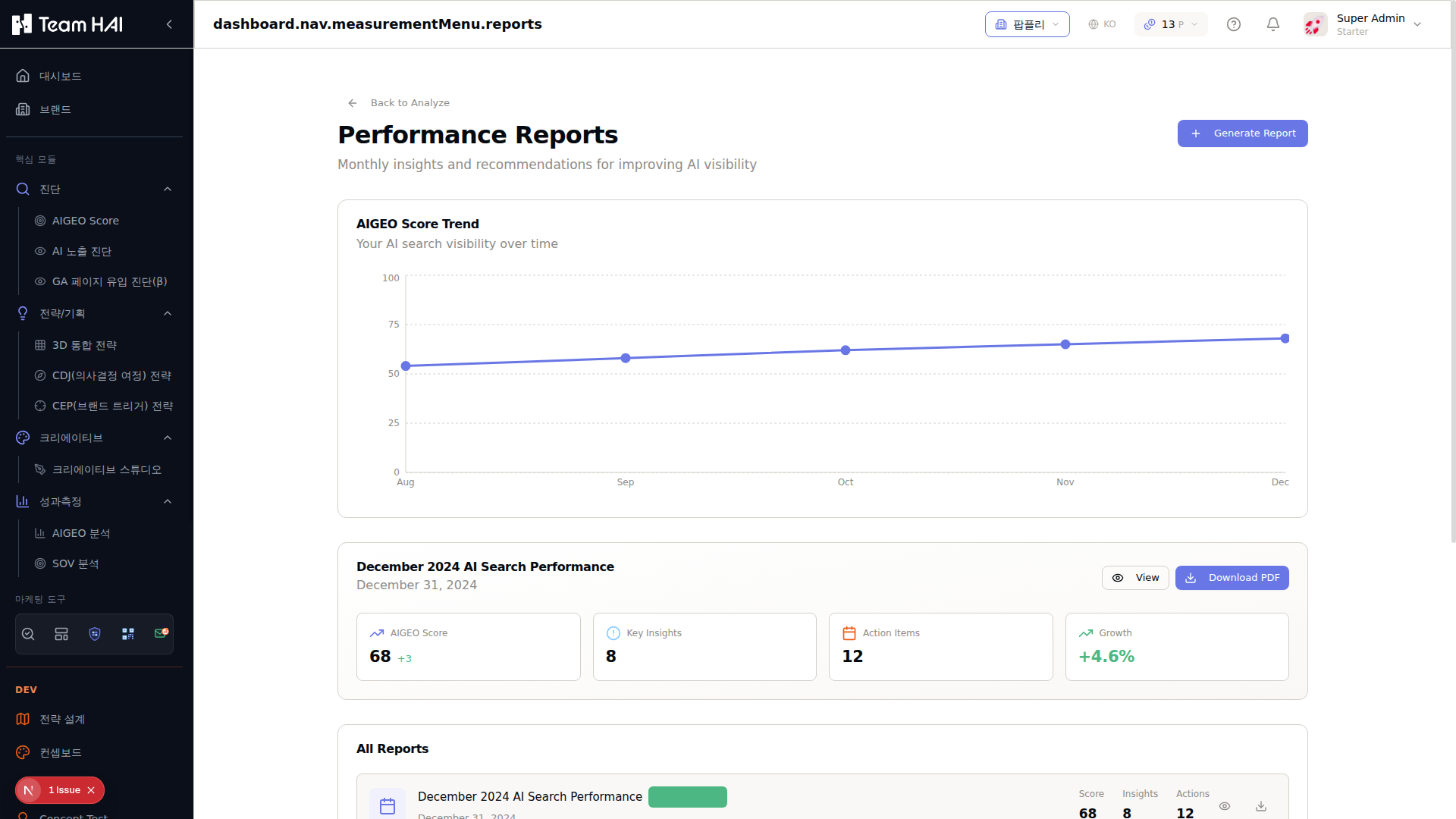
현재 기간의 성과를 종합한 리포트를 즉시 생성합니다.
시간에 따른 AIGEO Score 변화를 시계열 그래프로 보여줍니다.
AIGEO Score, 인사이트 수, 액션 아이템, 성장률을 한눈에 확인합니다.
리포트를 화면에서 보거나 PDF로 다운로드합니다.
월별로 자동 생성된 리포트 이력을 확인하고 조회할 수 있습니다.
성과 측정은 최소 4~8주 이상 데이터가 쌓여야 의미 있는 트렌드를 파악할 수 있습니다. 매주 같은 요일에 측정하는 습관을 들이면 주기적 변화를 정확히 추적할 수 있습니다.
보고 — 업데이트 예정
성과 데이터를 체계적으로 정리해 경영진, 고객, 팀원과 공유할 수 있는 맞춤형 리포트를 자동으로 생성하는 기능입니다.
보고(REPORT) 기능 준비 중
자동화된 성과 리포트 생성, 맞춤형 대시보드 공유, 정기 이메일 발송 등의 기능이 곧 추가됩니다. 현재는 분석 대시보드에서 수동으로 리포트를 생성할 수 있습니다.
자동 PDF 리포트
선택 기간 성과를 PDF로 자동 생성
공유 대시보드
특정 지표만 공유하는 맞춤 링크 생성
정기 이메일 발송
주간/월간 리포트 자동 이메일 수신
Terms, measurement & analysis
Understand what is measured, check the evidence and decide what to do next. A guide to the current Team HAI workflow and its key metrics.
Content reviewed: 2026.10.28
Distinguish three kinds of results
Page readiness, observations of AI answers and visitor behavior come from different evidence. One score does not explain every outcome.
Page readiness
Integrated Measurement checks technical and content signals. AIGEO Score and SEO, AEO and GEO scores are diagnostic values that guide improvements.
AI answer observations
SOV and AI Brand Perception analyze answers to configured questions. Their results apply to the selected questions, platforms and measurement run.
Search & visitor behavior
Connected GA4, Search Console and Bing Webmaster data show traffic and search performance, subject to the selected account, property, period and provider definitions.
Start here
- Check your brand name, aliases, official website and comparison brands. These settings provide context within Team HAI; they do not directly train external AI models.
- Diagnose key pages with Integrated Measurement and review the issues actually found.
- Choose questions and platforms in SOV or AI Brand Perception, then collect the original answers.
- Connect findings to strategy and content, then measure again under comparable conditions.
The current service workflow
Brand Management provides context for every stage. Feature links below require sign-in.
01Brand Management
Manage brand profiles, aliases, products, owned and earned media, and competitors. Select your target brand and check its settings against official information.
02Diagnose
Review findings and suggestions in AI Diagnosis, and connected search and visitor data in GA Page Diagnosis. Use Integrated Measurement for detailed page checks.
03Strategize
Start Integrated Brand Strategy from search engines, a completed SOV run, a completed brand perception analysis or direct questions. Use CDJ, CEP and Strategic Messaging to define customer situations and messages.
04Create
Draft content in Content Studio and review it in Content Editor. Use Video Studio and social publishing for your intended format and connected accounts.
05Measure
Integrated Measurement covers AIGEO Score and web performance. SOV observes brand exposure in AI answers. AI Brand Perception examines how the brand is described and identifies potential errors.
Glossary
These definitions are shared with contextual help in the product. Expand a term to see its measurement method and how to interpret it.
Search & page diagnosis
SEO · Search optimization
Making a page easier for search engines to discover and understand.
- How is it measured or analyzed?
- Combines technical checks and content evaluation of the collected page.
- How should I read it?
- Review the findings. A high score does not guarantee a top ranking.
AEO · Answer optimization
Making answers on a page easier for AI to find.
- How is it measured or analyzed?
- Evaluates answer structure, relevant markup and the clarity of content.
- How should I read it?
- Readiness is different from being included in an actual AI answer.
GEO · Generative AI optimization
Making content easier for generative AI to understand and use as evidence.
- How is it measured or analyzed?
- Uses stored AI evaluations of informative, credible and specific content.
- How should I read it?
- Does not measure AI training inclusion or actual citation counts.
AIGEO overall score
How easy this page is for search engines and AI to understand and use.
- How is it measured or analyzed?
- A weighted combination of the stored SEO, AEO and GEO evaluations. See the result's formula for its weights.
- How should I read it?
- A diagnostic score out of 100, not a ranking or recommendation probability.
Lighthouse page audit
An automated audit of performance, accessibility and other page qualities.
- How is it measured or analyzed?
- Displays the stored Lighthouse run; results depend on its device, network and timing.
- How should I read it?
- Distinguish lab tests from real visitor data.
Structured data · Schema
Machine-readable descriptions of products, organizations and other content.
- How is it measured or analyzed?
- Checks structured data types and fields in the page.
- How should I read it?
- Markup does not guarantee a rich result or AI citation.
AI answers & brand exposure
Analysis question · Query
A question a customer might ask a search or AI service.
- How is it measured or analyzed?
- Uses selected or generated questions as analysis inputs or sends them for response collection.
- How should I read it?
- Changing questions changes the results. Keep conditions consistent for comparisons.
AI responses
Answers collected for the configured questions.
- How is it measured or analyzed?
- Loads stored response text and processing states for the run.
- How should I read it?
- Separate failed requests from collected answers; outputs can change over time.
Measurement run
One execution of a project's question set.
- How is it measured or analyzed?
- Aggregates stored query counts, completion states and results.
- How should I read it?
- Compare runs with matching questions, platforms and settings.
AI brand exposure score · SOV
A summary of how prominently a brand appears in the sampled AI answers.
- How is it measured or analyzed?
- Uses the run's stored score calculated from mention, position, recommendation and source signals. Check its scoring version and details.
- How should I read it?
- Not mention rate or market share. A high score does not mean first place in every answer.
Brand mention rate
The proportion of analyzed answers mentioning the brand.
- How is it measured or analyzed?
- Calculates mentions as a proportion of responses included in the aggregation.
- How should I read it?
- Frequency does not indicate positive sentiment or recommendation strength.
Mention rank and position
Where a brand appears in an answer.
- How is it measured or analyzed?
- Uses stored order or placement classifications such as summary, list and body.
- How should I read it?
- Some answers have no identifiable rank. This is not a search ranking.
Mention sentiment
Whether an answer describes the brand positively, neutrally or negatively.
- How is it measured or analyzed?
- Uses the AI classification of the answer's context.
- How should I read it?
- This is not a public opinion survey. Check the original wording.
Recommendation strength
Whether a brand is a main recommendation, an option or a simple mention.
- How is it measured or analyzed?
- Classifies the context of the answer.
- How should I read it?
- Frequent mentions can still be weak recommendations.
Cited sources
Web pages connected as evidence in an AI answer.
- How is it measured or analyzed?
- Collects citation links and source metadata, then classifies domains.
- How should I read it?
- A source link is different from a brand recommendation in the answer.
Source brand relevance
Whether a source page relates to the target brand.
- How is it measured or analyzed?
- Uses available URL, title, page content and related evidence.
- How should I read it?
- Unverifiable is different from unrelated.
Customers & strategy
Customer persona
A hypothetical customer profile used to frame strategy or questions.
- How is it measured or analyzed?
- Uses entered, selected or generated customer traits as analysis context.
- How should I read it?
- Not a customer survey or proof of actual platform user personalization.
Customer decision journey · CDJ
A framework for needs, evaluation, purchase and use.
- How is it measured or analyzed?
- AI connects questions, keywords and strategies to the service's journey stages.
- How should I read it?
- Customers do not always move in a fixed order. This is not observed conversion data.
Category entry point · CEP
A situation or cue that brings a product category or brand to mind.
- How is it measured or analyzed?
- Derives and groups situations from brand, product and customer inputs and analysis materials.
- How should I read it?
- More than a keyword: consider who needs it, when and why.
Action priority
A proposed order for reviewing or improving items.
- How is it measured or analyzed?
- Uses stored priorities based on findings, importance and search or response signals.
- How should I read it?
- Not expected revenue or success probability. Consider execution cost and business goals.
Analysis evidence
Source text, observations or materials supporting a finding.
- How is it measured or analyzed?
- Displays evidence stored with this analysis.
- How should I read it?
- Missing evidence is not a verified fact. Check sources and dates.
Connected performance data
Channel grouping
Groups visits by where they started: AI search, organic search, paid search, social, referral, direct, email and other.
- How is it measured or analyzed?
- Follows the GA4 default channel group, but sessions whose source is an AI service such as ChatGPT, Gemini, Perplexity, Claude or Copilot, or whose medium is ai-assistant, are classified as AI search first. Source names also separate AI visits in periods before GA4 added its AI Assistant channel.
- How should I read it?
- If the AI search share grows, check which pages AI visitors land on in AI landing pages and strengthen them. Google AI Overviews and AI Mode clicks sit inside organic search; if direct traffic jumps, check campaign links for missing UTM tags.
AI traffic by engine
Trend of sessions that arrived by clicking a link in an AI answer, split by service.
- How is it measured or analyzed?
- Counts AI-classified sessions as ChatGPT, Gemini, Perplexity, Claude, Copilot or other. Periods of 31 days or less are shown daily and longer ones weekly; only the analyzed URL's site (ignoring www) is counted.
- How should I read it?
- When an engine's traffic rises or falls, see which pages it sends visitors to in AI landing pages. Being shown in an answer without a click is not captured, so check mentions and citations in SOV analysis.
Google search performance
How often the site appeared in Google results (impressions), with clicks, CTR and average position.
- How is it measured or analyzed?
- Loaded from Search Console; data usually arrives 2–3 days late. Average position is the average of the topmost position your link held each time it appeared.
- How should I read it?
- If impressions rise but CTR falls, improve the title and description shown in results; if average position falls, find the queries in opportunity queries and click change causes below. Rare queries are hidden for privacy, so the query table sums to less than total clicks.
Bing search performance
How often links to the site were shown and clicked across Bing web results, chat answers, news, images and more.
- How is it measured or analyzed?
- Daily clicks and impressions plus weekly query and page stats come from the Bing Webmaster API. Query and page stats arrive 1–2 weeks late, so the period is counted from the last data date.
- How should I read it?
- The latest 1–2 weeks are not in yet, so do not compare directly with Google figures for the same dates. If Bing impressions are low, submit a sitemap in Bing Webmaster Tools and announce new pages with the index request (IndexNow) in Meta manager.
How do we measure?
An overview of the evidence and analysis workflow we can share publicly. Check each measurement screen for its supporting evidence and applied settings.
Integrated Measurement · AIGEO Score
- What is observed?
- HTML, body text, metadata, structured data and available web performance checks collected for the selected URL.
- How is it processed?
- Technical checks and AI content evaluations are organized into SEO, AEO and GEO. Saved evaluations are combined into AIGEO Score on a 0–100 scale. Lighthouse results are available separately as web performance evidence.
- How should I read it?
- This is a diagnosis of the measured page at collection time. Review findings and evaluation states rather than treating it as a verdict on the entire domain. Observe actual AI recommendations and citations separately through collected answers.
AI SOV · Exposure across questions
- What is observed?
- Configured questions, platforms, personas and AI answers collected for the run. Brand names, matching terms and exclusions affect mention detection.
- How is it processed?
- Answers are checked for brand mentions and analyzed for position, sentiment, recommendation strength and sources. Signals included in SOV depend on the scoring version and settings. Review successful and failed requests alongside the collected answer count.
- How should I read it?
- SOV is Team HAI’s composite exposure score from 0 to 100. It is not mention rate, market share or the same metric as another service’s SOV. Competitor scores do not have to add up to 100. Review platform, question and persona breakdowns alongside original answers.
AI Brand Perception
- What is observed?
- Collected AI answers about the brand or selected subject, together with available sources.
- How is it processed?
- Descriptions and claims are extracted and similar messages grouped. Knowledge, sentiment, accuracy and consistency across platforms are evaluated and summarized as AI Brand Health. Negative messages and messages classified as incorrect become correction tasks.
- How should I read it?
- Accuracy is the share of claims judged correct among those judged correct or incorrect; unverifiable claims are excluded. Axes without sufficient evidence are excluded from the composite. Cross-platform consistency is not evaluated for a single platform. Review fact-check results against original answers and official evidence.
Search, visitor & strategy analysis
- What is observed?
- Available data for the connected GA4, Search Console and Bing Webmaster properties and selected period, or the search results and AI answers selected for a strategy task.
- How is it processed?
- Connected metrics follow their provider definitions. Strategy analysis uses selected evidence and brand context to derive customer situations, journeys, question intent, messages and priorities.
- How should I read it?
- Impressions, clicks, sessions and conversions use different units and aggregation rules. Strategy scores, situation shares and AI suggestions evaluate the analysis sample; they are not population statistics or revenue forecasts.
Turn results into actions
Start with the summary, then check evidence and comparison conditions before drawing conclusions.
- 1
Check scope and conditions
Confirm comparable URLs, question sets, platforms, personas, brand matching settings, periods and scoring versions. Read runs with changed settings separately.
- 2
Check original evidence
For page diagnosis, review collected fields and issue evidence. For AI analysis, read the answer and cited sources. Distinguish a brand mention, a recommendation and a citation of your own website.
- 3
Break down the results
Compare platforms, questions and customer types. An average alone can hide missed questions or failures on some platforms.
- 4
Improve and measure again
Address verified issues such as access or indexing settings, answer structure and incorrect official information. Record changes and dates, then compare subsequent runs under the same conditions.
Interpret with these distinctions
- 0 points / 0%: first check whether evidence exists. Missing data, failed requests and not-applicable checks differ from an observed zero.
- Source present: a reference was collected. This alone does not establish a recommendation or verify a claim.
- Score increase: a change under the measured conditions. Confirm rankings, actual traffic and revenue using the corresponding data.
- Positive / negative: an analysis of wording in collected AI answers, not a consumer opinion survey.
Measurement scope & limitations
This guide explains terms, evidence, analysis workflows and interpretation. It does not disclose internal prompts, detailed weights or detection rules, or customer-specific original data.
- Observations of a configured sample
- Team HAI analyzes answers for selected questions and platforms. It does not survey every user question or the entire AI search market.
- Answers and environments change
- Answers and sources may change with the model, search features and execution time. Responses obtained through service integrations may differ from those in consumer apps.
- AI classification can be wrong
- Message grouping, sentiment, fact checks and strategy suggestions may contain errors. Cross-check original answers and official evidence before important decisions.
- Available evidence varies
- Crawl restrictions, permissions, failed requests, provider delays and data limits can leave gaps. Missing evidence alone does not establish brand absence or zero performance.
Concept references
External references explain general concepts. They do not specify Team HAI scoring formulas or imply equivalence with other services.
- Google Search Central · SEO Starter Guide
- Google · Web Vitals
- McKinsey · Consumer Decision Journey
- Ehrenberg-Bass · Category Entry Points
Contact support for further questions. Contact us
Back to top